Even G2 AR Glasses Review
Translated by Claude Opus 4.8
I spent two weeks with the Even G2, a pair I’d made up my mind to buy back when I was in the U.S. It hasn’t launched in Korea yet, so I bought it through an overseas order.1 Unlike other AR glasses, I liked how light and minimalist the design is. The green single-color binocular display drew me in too. I’d briefly tried the Meta Ray-Ban Display, and there’s a clear difference between the two.
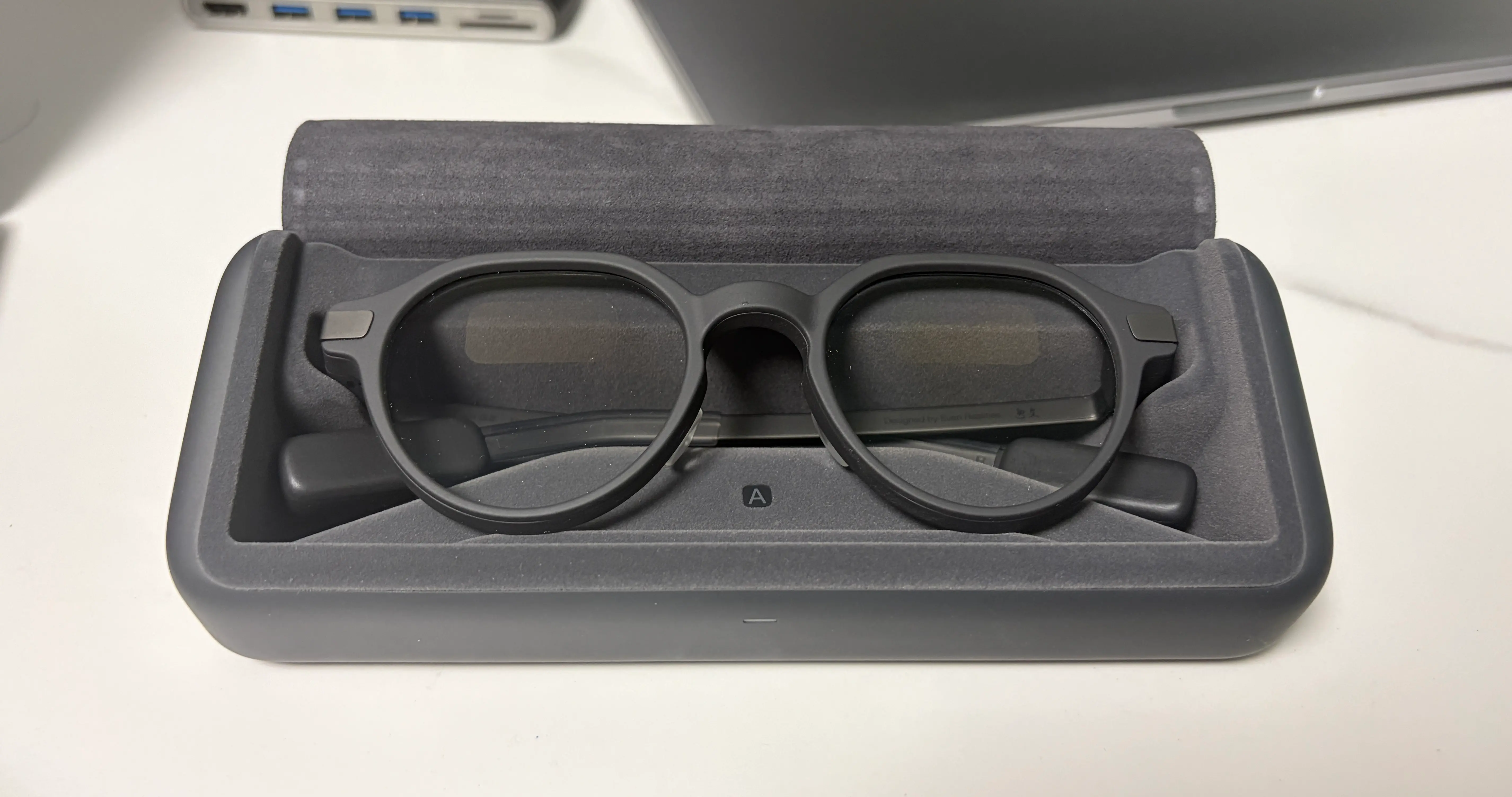
Meta uses a full-color display on one eye. The Even G2, by contrast, uses a single-color display on both eyes. You can really feel the deliberate choices they made.
It weighs 36 grams. Light enough to wear every day without it being a burden. That said, the sides are made of magnesium, so depending on the person it can press on the area near your ears and hurt, but the glasses come with rubber pads that keep it from pressing in. Personally, it’s thoughtful enough that it feels like a pair of glasses wearing the disguise of an electronic device.
The finish is solid too. The magnesium alloy plus titanium combination gives it a premium feel. You can’t even see the charging contacts from the outside. The case is nice as well. The inside of the case has a soft finish so the glasses don’t get scratched.
Now let me lay out the pros and cons I noticed wearing the Even G2 every day for two weeks.
1. Depth and the display
The advantage of a binocular display is depth. It blends into the space without getting in the way of what you’re looking at. It’s hard to capture that depth in a photo or video. It feels like a crisp display floating right in front of you, and it looks as real as a hologram out of Star Wars. With Meta, being on a single eye, it felt off and didn’t feel like it harmonized with the surroundings, but the Even G2 feels like it’s floating in the space, which is far more natural. A prime example: it makes finding your way easy when you’re riding a bike.
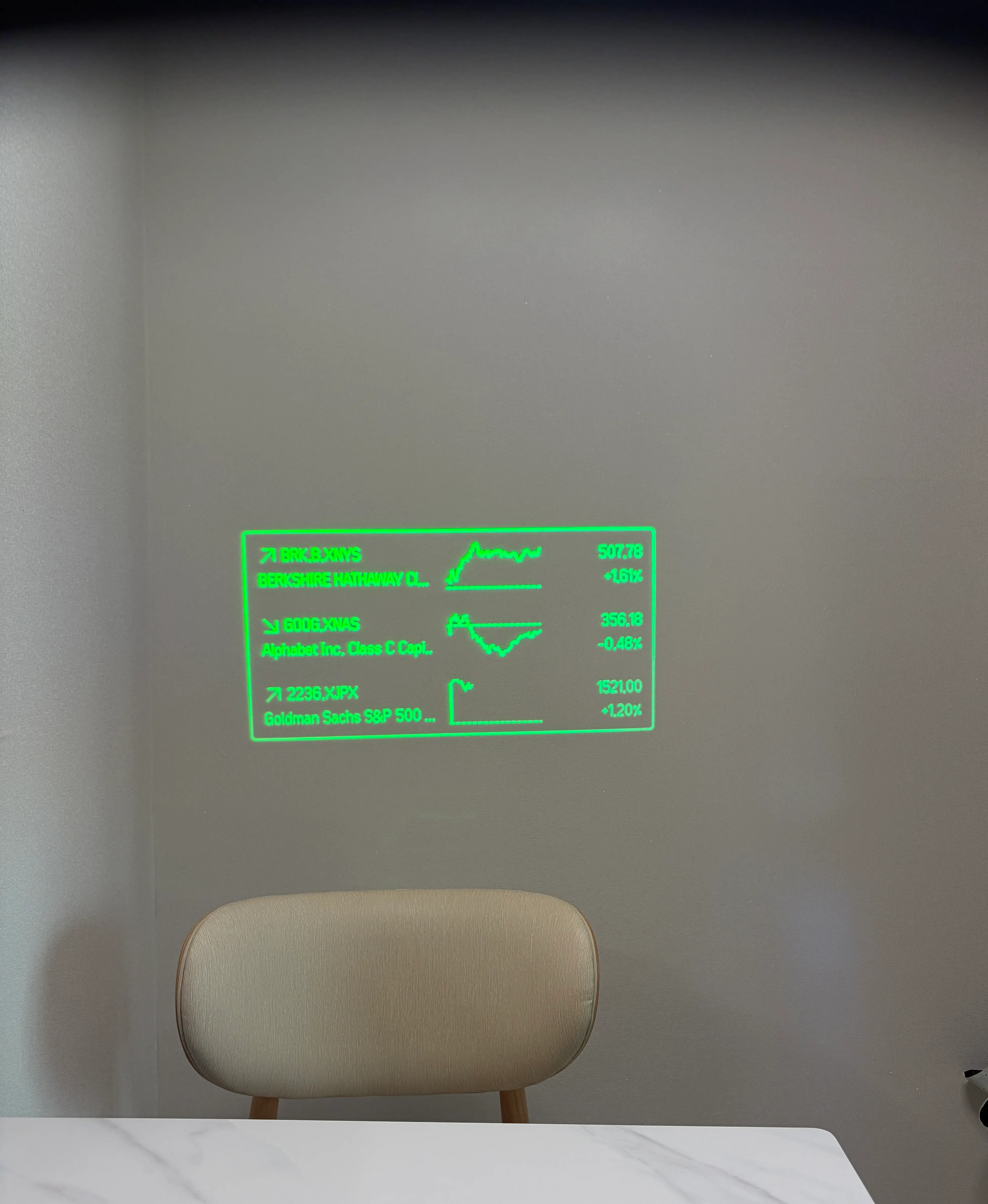
If you’re looking up at the sky in broad daylight it gets a bit washed out, but indoors or when you’re looking at objects around you outdoors, it’s crisp.
The downside is that the resolution isn’t good enough to display actual images. It looks roughly like this.
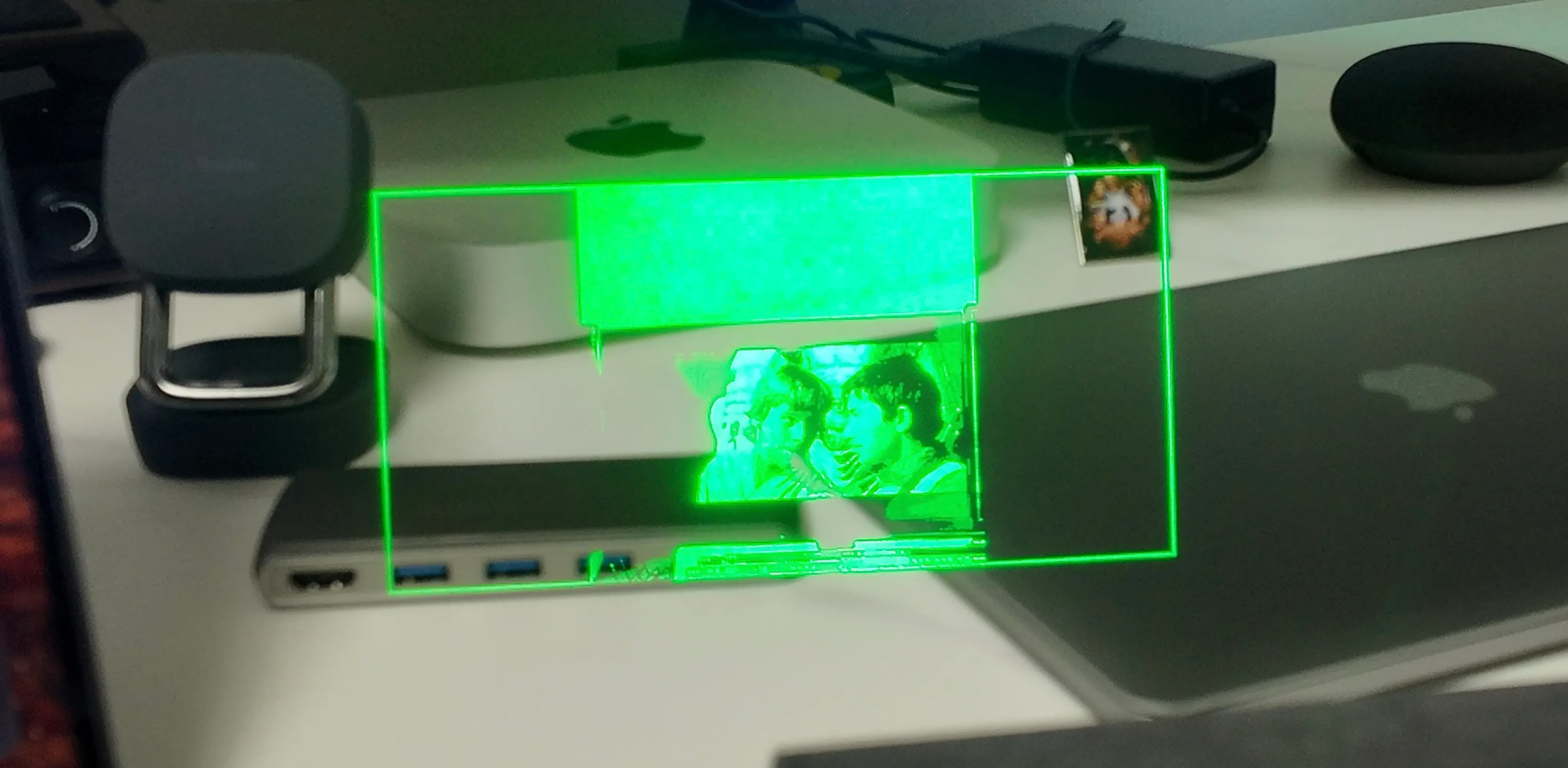
It’s not suited for putting up photos or complex rendering. The resolution fits text or pixel-style design well.
2. Well-executed fundamentals
There was almost no heat buildup. No problems even in July’s hot weather and blazing sun. When your surroundings are bright, it adjusts the display’s brightness on its own, so it looks crisp day or night. Even with the charger left unplugged for most of the time, the battery never dropped below 50%. As for the display, it isn’t on all the time (you can set it to always show), and you can turn it on with a simple gesture of looking up and then down. Or you can double-tap the sensor at the end of the frame. And you can set the display to turn off automatically.
On paper it has a built-in 192mAh battery that lasts 48 hours. The charging case can fully charge the glasses about 7 times, so it’s usable for weeks of real-world use. Basically, no battery worries.2
The heat management, the interface, the battery, and the display brightness are all impressive. If a next generation of the Even G2 comes out with multi-color and higher resolution, I’d expect that to deliver an overwhelming visual experience.
3. Minimalist design
Look at it from the outside and it doesn’t feel like a pair of AR glasses. It looks like ordinary glasses. The software is the same way. It has exactly the functions you need, nothing more. The widgets on the main view can display real-time news, a stock chart, a calendar, and notes. You scroll and control from the sensor at the end of the frame, or you can control it with a smart ring you have to buy separately. Personally I didn’t buy the smart ring, and setting the minimalist design aside, the reason is the inconvenience of adding yet another device to keep charged.
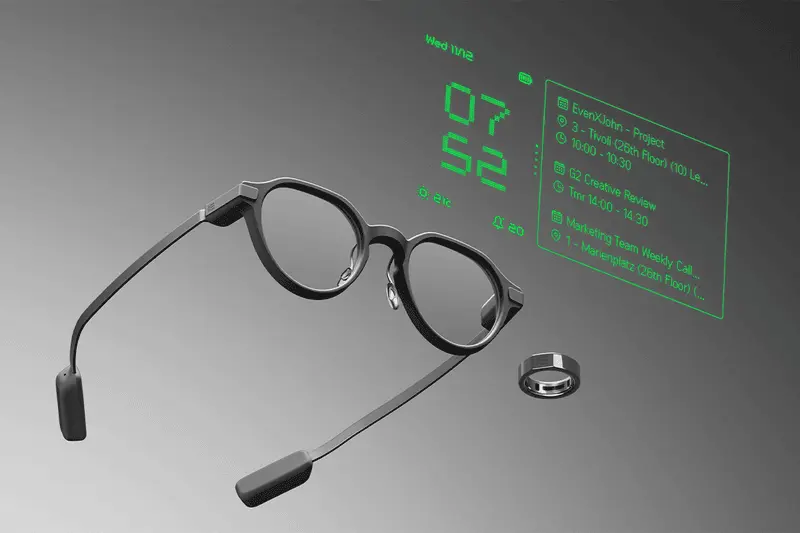
Between charging your phone, your AirPods, and your Apple Watch, once you add the glasses and a ring on top, there are just too many devices whose batteries you have to keep an eye on at once. The design is minimalist, but the setup you actually have to build out is closer to maximalism.
I think hardware-level UX is probably a problem every pair of AR glasses will have to solve going forward. Personally, I think if Apple linked gestures to AR glasses through the Apple Watch, there’d be a huge UX breakthrough. Meta also bundles a separate wrist band to control the Meta Ray-Ban glasses,3 but in Apple’s case the Apple Watch already holds that position. I have high hopes.
4. Ecosystem
Developing plugins uses the same languages as web development. It’s not some internal programming language, just HTML and JavaScript. The structure is that it renders and displays as a webview. There’s no need for some complicated development language; it’s implemented just like web development, which allows for very fast development. And unlike VR development, you can debug while wearing the glasses, so another advantage is that you can easily develop in a setting like a café.
There’s already a plugin ecosystem, so depending on the situation you can get more precise weather, set a timer, or even play chess (!).
5. AI
The AI features, which you could call the heart of these glasses, are excellent as a demo. You say “Hey Even” and ask a question, and the response comes right back. The user experience is smooth and good. But the moment you head somewhere even a little noisy and crowded, the voice recognition rate drops, and there are plenty of cases where it won’t even execute. There’s still a lot to improve. There’s no camera, so it’s also hard for the AI to know what I’m looking at right now. That limits how well it can understand space. You have to be satisfied with it as just an always-on AI assistant, more or less. Personally, I’d love it if they put a camera on it so it could recognize what’s around me and surface useful information.
Beyond the assistant, it also offers real-time translation, and this is decently usable in a quiet environment. When the person in front of you speaks English, it shows up translated into Korean in real time. The experience itself is smooth too. The Conversate feature it includes by default is a good idea in concept as well. As you talk with someone, it tells you whether what’s being said is grounded in fact. It’s a feature that corrects you when you say something wrong. The catch here, again, is that the recognition rate is far too low and it isn’t accurate. For instance, when I asked “Where did Outback originate?” it heard “Where did 900 originate?”4 and so on, meaning the basic condition for Conversate to even work isn’t met.
The price is $599, which isn’t cheap. It’s not yet a mainstream “wow,” and the usefulness of the features themselves isn’t that high either. The controls are still awkward. Unless you’re an early adopter or a developer, I don’t recommend buying it. The hardware finish is good, but the AI features are weak and there’s no killer app. A map app would be the closest thing to a killer app for people who ride bikes or do deliveries, but the default map app built into the Even G2 doesn’t do navigation well either.5
The future of AR glasses
In the BBC drama Sherlock, there’s a character named Magnussen. He has a mind palace like Sherlock’s, and effectively he remembers anything he sees just once. The distinctive part is that when he looks at a person, information about them is displayed off to the side. It looks just like viewing the world with a pair of AR glasses on.6 7

AR glasses going forward look likely to settle into a position like the combination of real-time recording (AI voice notes) + an AI agent + real-time translation + a watch. Whatever the case, they’re expected to be a device that raises human capability across the board, whether by boosting human memory, sharpening situational judgment, or (if there’s a camera) dramatically enhancing your field of vision through a zoom function (and if it links up with a 360-degree camera, you might even see 360 degrees in real time).
Just as AI is now widely used across company work, I think AR glasses will soon move into that same position. Just as Apple first staked out a market position as a work desktop and gradually expanded into consumer use,8 I think AR glasses will likewise be used first in company settings and then gradually widen into the consumer market.
In the end, the core is the enhancement of human capability. Remembering facts or other information you couldn’t, giving you the right advice at the right time: the integration of AI and AR glasses is a future that Apple, Google, and Meta are all already preparing for.
The direction of technological progress running from computers to the internet to mobile to AI has always aimed at enhancing human capability. It brought out abilities earlier humans didn’t have. AR glasses are no different.
Footnote
-
As of July 2026, there’s still been no announcement of a Korean launch. That said, given that it supports Korean in its AI features and translation, and that the packaging has Korean descriptions on it, it looks like something is in the works internally at the company. ↩
-
See Even Realities’ official support document “Battery & Charging.” The glasses have a built-in 192mAh battery that lasts about 2 days on a full charge under normal use, and the charging case can fully charge them about 7 times. https://support.evenrealities.com/hc/en-us/articles/13499279151375-Battery-Charging ↩
-
Meta implements clicking through a separate wrist band, with a gesture of touching your index finger and thumb together in the air. For example, if you want to adjust the volume, you can control it by holding the pinch and rotating your wrist. ↩
-
It probably heard “Outback” as “nine-back” and interpreted it as 9 + 100 = 900. ↩
-
With the map, there’s a bug where it can’t find the exact location in Korea. And it fails to update shortcuts or newly built roads, making it worse than the features that existing Korean map apps provide. ↩
-
Sherlock S3E3 “His Last Vow,” aired January 2014. ↩
-
For reference, the point of view of the image here is Magnussen’s first-person view. The person in front is Lady Smallwood. ↩
-
The spreadsheet VisiCalc, released in 1979, is called the first “killer app” for the personal computer. Businesses started buying the Apple II, which had been seen as a hobbyist device, for work, and the work market formed this way in turn pulled in home purchases on the grounds that it was “compatible with the office.” The Macintosh, too, first took over the work market of desktop publishing with the LaserWriter + PageMaker combination before widening into the consumer market. ↩